
TextExpander is coming to retail! You should be seeing it at your local Apple Store this month. It’s priced at $29.95 (same as the download version), and the box includes a CD with the software and a Quick Start card. Send us your photos of TextExpander in the Apple Store. We’ve got lots of good photos of PDFpen. Now we want TextExpander! The first person to send me a photo that we can post will win their choice of SmileOnMyMac software plus the fabulous limited-edition SmileOnMyMac coffee cup!
Fun with Sounds in TextExpander
1) I downloaded the sound at The Freesound Project, a huge collection of user-contributed sound files, made available under a Creative Commons License. (If you want the “oops”, it’s here.) Registration is free and is required for downloading.
2) I dragged the sound file “9020_WIM_oops.wav” into my home directory’s Library>Sounds folder.
3) In TextExpander preferences, I selected the Autocorrect group and clicked on the Sound drop-down menu. The “oops” was now one of the choices. (If the System Preference pane is already open to TextExpander, you might need to close it and reopen it.)
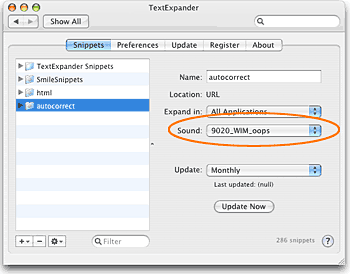 I think the possibilities are interesting and endless. If you’ve got a sound that would make a great TextExpander alert, let us know in the comments. Even better: upload it to the Freesound Project and give us the link!
SOMM on the Typical Mac User Podcast
Victor Cajiao interviews me for the Typical Mac User Podcast, episode 108. We chat about the company and our products. Victor is a big fan of BrowseBack (he calls it “Time Machine for Web Browsing”) and says that TextExpander has changed his life. 
Victor’s running a contest for copies of DiscLabel, TextExpander and PDFpen, so give the podcast a listen to find out how you can win.
PDFpen and the Paperless Office
Gordon Meyer, author of Smart Home Hacks, wrote an article entitled “My Paperless Office” which appeared on his blog and the O’Reilly Mac DevCenter Blog. He writes about how he has been using his Fujitsu ScanSnap500M Instant PDF Sheet-Fed Scanner. It sounds pretty cool how he’s managed to eliminate 3 boxes of stored paper. He uses DevonThink Pro Office to catalog and manage the PDFs, and PDFpen is part of the workflow too:
I normally use Skim to view PDFs, but while scanning I prefer PDFPen instead. It’s the perfect tool for this task because it lets me rearrange and delete pages within the finished PDF.Gordon is also the contributor of one of our most popular TextExpander tips, on using the clipboard built-in macro.
We're Ready for Leopard!
We released three updates tonight: TextExpander 2.0.3, BrowseBack 1.4.1, and PhotoPrinto 2.1.1. These updates add Leopard compatibility, and are free for registered users. We had already updated our other products for Leopard: PDFpen 3.3, DiscLabel 4.4.1, and PageSender 4.1. As always, if you have any problems, just get in touch with our friendly (and prompt!) support team.