
1) I downloaded the sound at The Freesound Project, a huge collection of user-contributed sound files, made available under a Creative Commons License. (If you want the “oops”, it’s here.) Registration is free and is required for downloading.
2) I dragged the sound file “9020_WIM_oops.wav” into my home directory’s Library>Sounds folder.
3) In TextExpander preferences, I selected the Autocorrect group and clicked on the Sound drop-down menu. The “oops” was now one of the choices. (If the System Preference pane is already open to TextExpander, you might need to close it and reopen it.)
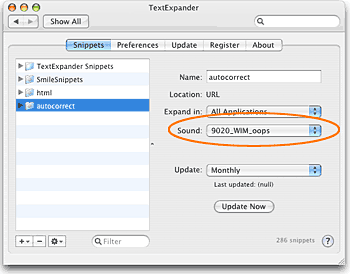 I think the possibilities are interesting and endless. If you’ve got a sound that would make a great TextExpander alert, let us know in the comments. Even better: upload it to the Freesound Project and give us the link!