
Despite the craziness that is Macworld Expo Week, I had a chance to sit down on Wednesday with Megan Morrone and Leo Laporte on their podcast, Jumping Monkeys. The general theme of the podcast is “parenting in the digital age.” I recently launched a personal blog called The Favorite Aunt that focuses on tips for aunts and uncles, and they thought it would be interesting to talk about kids and technology from the aunt perspective. I’m also a co-founder with my sisters of the preschool reading magazine, The Tessy & Tab Reading Club, which Megan’s kids are subscribed to. I talked about how you can use DiscLabel to make fantastic packaging for your nieces’ and nephews’ favorite music, and how the iPhone is the ultimate aunt tool. You can check it out on iTunes or at the TWiT website.
TextExpander As A Study Aid
Thanks for developing this great product. Being new to the Mac, I have been trying out a lot of programs, and just happened to run into TextExpander. At first I started using as most people would – to produce recurring snippets while typing. But now I use it as a system where I can keep tidbits of information I need to memorize and recall them quickly. When I am studying, if I come across a definition I need to memorize, I just select the text and create a shortcut for it with the prefix ll (learn). This way when I am reading and come across a term I dont remember, I quickly type the shortcut in my scratch pad and am able to see the definition. This has really helped me memorize a lot of stuff. This is a good opportunity to point out the new Hotkey preference in TextExpander 2 for creating snippets on the fly. You can designate the key combination you want to use for creating snippets from a selection or from the Clipboard in the TextExpander pane in System Preferences, under the “Preferences” tab. Once you set the hotkey, all you have to do is select the content you want to make into a snippet and press the hotkey combination. The TextExpander pane will open and the selected contents will be pasted into the snippet content field. Assign an abbreviation and you’re done.
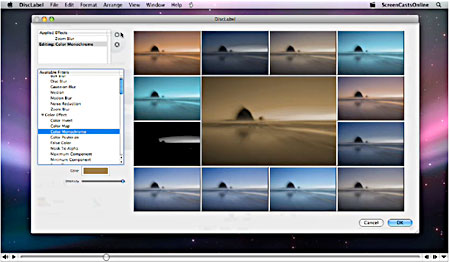
DiscLabel: Video Tutorial Now Available
video tutorials we just posted on our website.
Produced by Don McAllister of ScreenCastsOnline, this series covers new design creation, iTunes and iPhoto integration, design editing, using special effects and clip art, among other topics. It’s a fantastic introduction to DiscLabel, but even experienced DiscLabel users may learn something they didn’t know.
I also highly recommend checking out ScreenCastsOnline. It’s a terrifically informative series of Mac-related tutorials. There are free tutorials that you can subscribe to via iTunes. There is also a ScreenCastsOnline Extra! membership that entitles you to view the entire library of screencasts as well as special members-only content.
I have been an Extra! member for several months. Don’s tutorials have gotten me through lots of tricky stuff on the Mac, including upgrading to Leopard. He really does have a gift for knowing how much detail to provide–enough so that you do learn how to do something, but not so much that you feel overwhelmed.
TextExpander: New Video Review
 Michael Mistretta at MacApper has posted a very good video review of TextExpander’s features. It covers the new TextExpander 2, so it makes a great sequel to Merlin Mann’s demo at MacBreak.
MacApper will also be giving away two copies of TextExpander:
Michael Mistretta at MacApper has posted a very good video review of TextExpander’s features. It covers the new TextExpander 2, so it makes a great sequel to Merlin Mann’s demo at MacBreak.
MacApper will also be giving away two copies of TextExpander:
In order to enter this giveaway, you must comment on this post with 3 of the most repetitve phrases that you use every day. Make us laugh. Alternately you can add some suggestions on what features you would like to see with TextExpander.Some of the TextExpander abbreviations that have been posted certainly made me smile…
MacSanta has come to town!
Quite a number of our fellow Mac software developers have teamed up to bring a little joy to Mac users this holiday season, in the form of the MacSanta 20% discount!
Every day, until December 24, five different developers’ wares are featured at 20% off for one day only. SmileOnMyMac is featured today! Besides the daily 20% off specials, you’ll find extended savings of 10% off during the rest of the MacSanta festivities. (One of our “smileworthy” picks, SpamSieve is among them!)
Thanks to Paul Kafasis of Rogue Amoeba for organizing this great gift for fans of Mac software.
SmileOnMyMac’s products can help with the holidays. Use DiscLabel to make CDs, DVDs, and packaging for holiday gifts. Use PDFpen to handle last-minute corrections to your family’s annual letter. Use TextExpander to save time typing your thank you notes. Use PageSender to fax your Christmas list to Santa. Use BrowseBack to provide a visual history of your Web search for the perfect present. Use PhotoPrinto to create stunning photo albums on your ink jet printer.