How iOS 7 Affects TextExpander touch

Philip Blog, iPhone, TextExpander, TextExpander Tips

When you update to iOS 7, you may find that TextExpander doesn't work in some apps which did work on iOS 6. Due to a change in iOS 7, those apps no longer have access to shared snippets. We have communicated with developers whose apps support TextExpander, and we've provided them an updated SDK with a new way to share snippet data. Many developers are working hard to ensure their apps are updated. Bear in mind that review times and other issues are beyond their control.

Please update to TextExpander touch 2.1.1, and allow it access to your Reminders. After you install iOS 7, we recommend that you turn on automatic app updating so that when app developers deliver updated TextExpander support, you'll get it right away.

Thanks for using TextExpander and the apps with TextExpander support. We've done our best to work through a situation mostly beyond our control. Our fellow  developers have been very supportive, and we anticipate they will deliver apps using the updated TextExpander SDK promptly. (More technical details regarding the change and our solution are below, if you are interested.)

We maintain a list of apps with TextExpander support. As developers update their apps to work with TextExpander in iOS 7, we will add them to the list. If you have any questions, just drop us an email at support@smilesoftware.com.

Here's what you can do:

– Update to TextExpander touch 2.1.1
– Let developers know that you use TextExpander in their app
– Ask those developers if they plan to update to the TextExpander 2.1 SDK
– Be patient with developers as they work hard to update their TextExpander support
– If your developer is not aware of this issue, point them to this blog post

What changed? Some technical details

Prior to iOS 7, TextExpander stored shared snippet data in a persistent pasteboard named “TextExpander”. The TextExpander code in supported apps read from the “TextExpander” pasteboard. Unfortunately, other libraries used these persistent named pasteboards to store and retrieve information used to track users across apps, without their knowledge or consent.

Apple decided to put a stop to that by prepending one's team ID to their named pasteboards, e.g. “Smile.TextExpander”. This allows shared pasteboards within one's own company's apps but not across unrelated apps. For example, if Drafts requested the “TextExpander” pasteboard, iOS 7 updates the request to “AgileTortoise.TextExpander” such that Drafts cannot access the shared TextExpander snippet data. (In fact, the new pasteboard names are more complex than this example.)

Smile has responded to this by discussing the issue with Apple engineers at WWDC, filing a bug (#14168862), and checking up on the status of that bug. We also developed a workaround by storing the TextExpander data in a new place. Reminders requires user consent to store and retrieve data. Completed reminders are not normally shown in its interface. Long-past reminders appear at the bottom of the completed reminders.

TextExpander touch 2.1 (and later) supports storing shared snippet data in a long-past, completed reminder. We produced an updated SDK and kept our developers posted on its progress. Our final SDK was ready within a few hours of the end of Apple's official iOS 7 announcement.
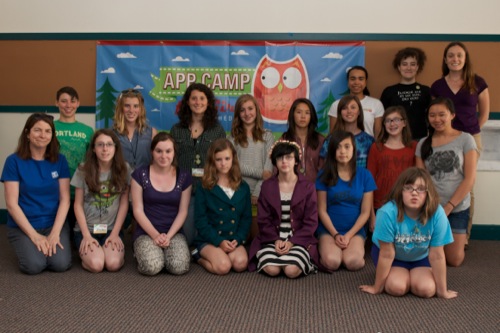

App Camp For Girls!

Philip Blog, Photos, Public Appearances, Smileworthy

App Camp For Girls: August 2014

This summer, I took a four-month sabbatical from my work at Smile to launch App Camp For Girls, a program that teaches girls ages 12 to 14 how to brainstorm, design, build, and pitch iPhone apps, mentored by women developers.

The idea had been percolating for some time. If you've ever attended a developer conference, the lack of women participants is striking. While there are a lot of theories about why that might be, it seemed to me that it would help if we got girls interested in software development at a young age. Drawing on my experience with the Rock 'N' Roll Camp For Girls, where girls form a band, learn an instrument, write a song and perform a showcase all in one week, I wanted to put on a program that would be fun and educational.

The camp was a big success this summer. We put on two week-long programs. In both sessions, the girls worked on their own quiz apps, which were built in Xcode and deployed to iPod touches. This was an important feature of the camp program. Each camper was issued an iPod touch to use for the week, so that they could build their apps onto the device and take it home to show off your work. There is nothing that compares with the sense of accomplishment the first time you run an app that you wrote on a device!

The community has been incredibly supportive of our efforts. We held an Indiegogo campaign in June/July which raised $106K, over twice our original target. With the additional funds, we will focus on expanding the App Camp For Girls program beyond Portland for Summer 2014.

If you are interested in volunteering or registering for App Camp For Girls, please fill out the form on the website.

I'm happy to be back working full-time at Smile. My colleagues have been amazing, generously taking over my Smile responsibilities so that I could devote this time to get App Camp For Girls off the ground. Maia Olson, our awesome support geek and marketing associate, even came up from California both weeks to coach a group of girls through the development process. (That's Maia in the photo, third from the right in the back row.)


PDFpen 6 released; special upgrade pricing for 48 hours

Philip Blog, PDFpen, Smileworthy

PDFpenWe are very excited to release a major new version of our popular and award-winning PDFpen and PDFpenPro for Mac. Version 6 has lots of great new features and enhancements, including:
– Microsoft® Word export
– New editing bar and enhanced design for better ease-of-use
– Support for Auto Save and Versions
– Optimized for Retina displays
– Drag and drop to reorder Library items

It has always been our policy to offer current users an upgrade path when a new version is released. Because PDFpen is available in both the Smile Store and the Mac App Store, upgrades are more complicated.

There is no mechanism for offering upgrades in the Mac App Store. To accommodate customers who wish to purchase Mac App Store versions, special pricing will be offered for the first 48 hours. PDFpen will be $29.99 and PDFpenPro will be $39.99 for this very limited time. The special pricing expires on March 20 at midnight PDT.

To further complicate things, Apple restricts iCloud access to apps purchased on the Mac App Store. If you need iCloud support, you must purchase PDFpen 6 or PDFpenPro 6 from the Mac App Store.  (Support for Dropbox cloud storage and syncing is available in both the Mac App Store version and the Smile Store version.)

So, here it is, in a nutshell:

Upgrade Pricing – Mac App Store (First 48 hours only)
PDFpen: $29.99
PDFpenPro: $39.99
Includes iCloud support

Upgrade Pricing – Smile direct purchase
PDFpen: $30
PDFpenPro: $30
PDFpen to PDFpenPro: $40
Does not include iCloud support

Customers who purchased on or after October 15, 2012 are entitled to free upgrades to the Smile Store version. We have no means to offer free upgrades in the Mac App Store.

After the 48 hour special is over, Smile's standard upgrade pricing will continue to be available directly.

We are really proud of the work we've done to make PDFpen 6.0 a worthy upgrade. Your feedback and suggestions help us make PDFpen the best PDF editing tool for Mac and iOS. If you have any questions, just email us at support@smilesoftware.com–we are ready to help!


Countdown To Macworld: Day 10!!

Philip Blog, Live, Public Appearances, Smileworthy

It's Macworld Eve! Tomorrow, we'll be demoing great Smile apps at our 10th Macworld Expo. 

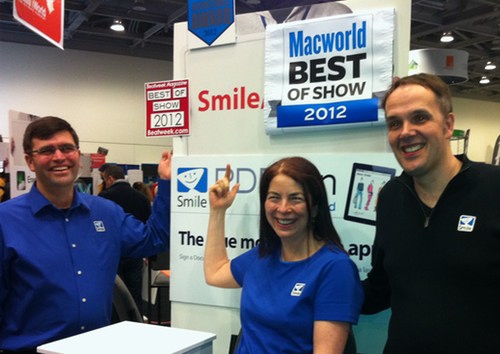
Today's photos are from last year's show. 2012 was an exciting year for us. We launched PDFpen for iPad, which won Best of Show from Macworld, The Mac Observer, and Beatweek Magazine. We had a great team at the booth. Two new faces in this photo: Éric (far left) and Colin (far right), both super-talented developers who work with us to make PDFpen the very best!

2012 Smile team

Our 2012 team, left to right: Éric, Philip, Jean, Angel, Maia, Greg, Edward, Brian, Colin. Below, Greg, Philip and I finally get a moment together to smile ourselves at the end a crazy busy Macworld!

2012 Smile partners

Please come see us this year, January 31 to February 2, in the Moscone West Expo Hall. We'll be on the far right side of the Appalooza section of the floor, showing off the new PDFpen for iPhone! 

Today's the final day of our Countdown to Macworld celebration of Smile's 10th anniversary. As promised, today's winners (one on Twitter, one on Facebook) get a bundle with all the prizes we've given away over the last nine days:

  • PDFpenPro
  • PDFpen for iPad
  • PDFpen for iPhone
  • TextExpander for Mac
  • TextExpander touch
  • DiscLabel
  • Smile mug
  • TextExpander water bottle
  • Smile special 10th anniversary screen cloth 

Remember to tweet your birthday greetings (tagged #smile10) and/or share them via Facebook comments. We'll pick the winners randomly from the comments we receive!


Countdown to Macworld: Day 9

Philip Blog, Live, Public Appearances, Smileworthy

Here we are in 2011. We switched back to a kiosk, because of the convenience. It takes a lot of work to put together a full booth! You might notice we look less tired this year. 

In the photo: Brian, Edward, Jean, Jordan, Greg. Jordan Satok was one of our support geeks back then. He's deferred going to college to run his own company, App Hero, and raise venture funding. It was great having him at the booth that year.

Philip, Maia, and Angel were also working the booth in 2011, but somehow we missed getting them in a group photo…

Remember to tweet your birthday greetings (tagged #smile10) and/or share them via Facebook comments. Every day until the opening day of Macworld, we'll be giving out some prizes to random tweeters and commenters. Today's prize is winner's choice: you pick the app (or the swag) you'd like to have. 

Smile 2011