
 We’re announcing a very special collaboration with some of our favorite people in the Mac development community. The Mac Switcher Bundle offers 3 popular and top-rated Mac OS X utilities (TextExpander, 1Password and Witch)Â along with a special series of video tutorials aimed at the new Mac user from ScreenCastsOnline. This bundle (a great gift for the new Mac users in your life!) is only $49.95, a discount of over 50% of its value.
We wanted to give new Mac users a taste of what makes the Mac OS X experience so great. All three of these utilities are favorites among those who make the lists of must-have Mac software. All three have been awarded 4.5 mice by Macworld. But we wanted to go beyond a great software bundle, and add the top-quality ScreenCastsOnline video tutorials that help new Mac users take full advantage of the power of their shiny new hardware.
For me, the collaboration is also emblematic of what makes the Mac so great: a wonderful community of fellow enthusiasts. Dave Teare at Agile Web Solutions supported the idea from the beginning. We’ve both worked with Don McAllister of ScreenCastsOnline and know firsthand the value of his video productions via his TextExpander and 1Password tutorials. We knew that an educational component would make this bundle unique.
Finally, Peter Maurer of ManyTricks suggested Witch as an ideal program for easing the transition from Windows to Mac by offering a window-switching functionality that former Windows users were accustomed to. (And Peter is the original developer of Textpander, so it comes full circle…)
We have really enjoyed working with these guys to put this together, and we are looking forward to spreading the word about the Mac Switcher Bundle at Macworld 2009, coming up so very soon…
We’re announcing a very special collaboration with some of our favorite people in the Mac development community. The Mac Switcher Bundle offers 3 popular and top-rated Mac OS X utilities (TextExpander, 1Password and Witch)Â along with a special series of video tutorials aimed at the new Mac user from ScreenCastsOnline. This bundle (a great gift for the new Mac users in your life!) is only $49.95, a discount of over 50% of its value.
We wanted to give new Mac users a taste of what makes the Mac OS X experience so great. All three of these utilities are favorites among those who make the lists of must-have Mac software. All three have been awarded 4.5 mice by Macworld. But we wanted to go beyond a great software bundle, and add the top-quality ScreenCastsOnline video tutorials that help new Mac users take full advantage of the power of their shiny new hardware.
For me, the collaboration is also emblematic of what makes the Mac so great: a wonderful community of fellow enthusiasts. Dave Teare at Agile Web Solutions supported the idea from the beginning. We’ve both worked with Don McAllister of ScreenCastsOnline and know firsthand the value of his video productions via his TextExpander and 1Password tutorials. We knew that an educational component would make this bundle unique.
Finally, Peter Maurer of ManyTricks suggested Witch as an ideal program for easing the transition from Windows to Mac by offering a window-switching functionality that former Windows users were accustomed to. (And Peter is the original developer of Textpander, so it comes full circle…)
We have really enjoyed working with these guys to put this together, and we are looking forward to spreading the word about the Mac Switcher Bundle at Macworld 2009, coming up so very soon…
MacMania: A Geek's Second Favorite Activity
my MacMania group, and find others by searching on the tag #macmania8.
Here’s a little sample of what I’m talking about
A shot of the Costa Atlantic bow, docked in Marmaris, Turkey:
 Same shot using 3 different Photoshop adjustment layers on selected areas of the image to correct the lighting and color:
 Costa Atlantica smokestack. The ship offers incredible composition possibilities:
 Upper deck, lonely waiter, clock in foreground:
 Hookahs in Marmaris:
 Turkish lamps:
 Apparently, one of my favorite subjects is other photographers. That’s David Pogue shooting me shooting him during our wild jeep ride in the Sahara:

MacMania: A Sea of Macs
Messina, a port city in Sicily, was a short but sweet stop. I got off the boat just to wander around the town, rather than get on a tour bus. It’s tempting to take one of the many excursions offered through the cruise line, but it’s great to get out for some exercise and fresh air.
 I understand the concept of sea legs now. I have felt a small twinge of weirdness from the motion of the boat. Nothing like full-on sea sickness, but just a enough to keep me from wanting to eat or drink too much; on a cruise ship, this is A Good Thing.
What I didn’t expect was to feel a bit wobbly on land. My brain keeps telling my body that we are rocking on the waves, even on solid land.
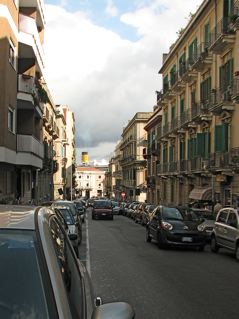
(The cruise ship is so big, you can actually see the smokestack from most of Messina while you walk around. Good for not getting lost. In the photo on the right, the yellow smokestack is visible at the end of the street.)
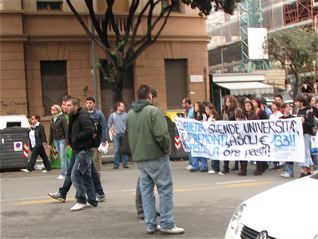
The most interesting thing on my walk around Messina was a large student demonstration marching through the streets. With my rudimentary Italian, I divined that they are demanding no tuition fees and educational reforms. (Actually, even without knowing any Italian, you could figure that out. The 1960s live on!) The sounds of drumming and chanting filled the air.
I understand the concept of sea legs now. I have felt a small twinge of weirdness from the motion of the boat. Nothing like full-on sea sickness, but just a enough to keep me from wanting to eat or drink too much; on a cruise ship, this is A Good Thing.
What I didn’t expect was to feel a bit wobbly on land. My brain keeps telling my body that we are rocking on the waves, even on solid land.
(The cruise ship is so big, you can actually see the smokestack from most of Messina while you walk around. Good for not getting lost. In the photo on the right, the yellow smokestack is visible at the end of the street.)
The most interesting thing on my walk around Messina was a large student demonstration marching through the streets. With my rudimentary Italian, I divined that they are demanding no tuition fees and educational reforms. (Actually, even without knowing any Italian, you could figure that out. The 1960s live on!) The sounds of drumming and chanting filled the air.
 But enough about tourism. Let’s talk about Macs.
The MacMania sessions have been great. After we pulled out of the port of Messina, I went to two sessions back-to-back by Josamir King from Apple, on iPhoto and Numbers, Apple’s spreadsheet application.
I have been using Numbers for quite a while, but haven’t really pushed it beyond being a substitute for Excel. Josamir showed us a lot of tips on using the Apple-ness of Numbers, i.e. how to make your spreadsheet more user-friendly and visually-appealing. He pointed out a dozen little things that I have overlooked.
Here’s an example: there’s a tiny icon at the bottom of the Numbers window, next to the Zoom percentage, that opens up options for Print View. That gives you a couple of buttons for landscape/portrait mode and a slider to scale the size of the content to fit on the printed page. As you adjust that slider, you can easily see how your pages will be laid out and you precisely determine how much you’ll need to shrink to fit, without ever going into the Print dialog.
(There! Does that convince you that we are really geeking out here?
But enough about tourism. Let’s talk about Macs.
The MacMania sessions have been great. After we pulled out of the port of Messina, I went to two sessions back-to-back by Josamir King from Apple, on iPhoto and Numbers, Apple’s spreadsheet application.
I have been using Numbers for quite a while, but haven’t really pushed it beyond being a substitute for Excel. Josamir showed us a lot of tips on using the Apple-ness of Numbers, i.e. how to make your spreadsheet more user-friendly and visually-appealing. He pointed out a dozen little things that I have overlooked.
Here’s an example: there’s a tiny icon at the bottom of the Numbers window, next to the Zoom percentage, that opens up options for Print View. That gives you a couple of buttons for landscape/portrait mode and a slider to scale the size of the content to fit on the printed page. As you adjust that slider, you can easily see how your pages will be laid out and you precisely determine how much you’ll need to shrink to fit, without ever going into the Print dialog.
(There! Does that convince you that we are really geeking out here?  )
“Extreme Googling” was the topic of David Pogue’s presentation last night. Wow! He showed us so many amazing things you can do with the various Google services, my head was spinning. His main point, and probably the most important in terms of productivity for me was:
“Use Google for everything.”
Sure, I thought. I do that already. Google is the only search engine I use. But no! I still go to the home page of Amazon.com first before entering a search for a book I want, or IMDB.com to get movie information.
From now on, I’ll just Google “Amazon Tipping Point” or “IMDB High School Musical 3” and click on “I’m Feeling Lucky”. In most cases, that will take me straight to the page I want, rather than having to go through the intermediary steps of going to another site, performing a search there and clicking on a link in the results.
A little tip I didn’t know: when formulating a search, two dots (..) means “range from/to”. If you were trying to find out, say, the names of U.S. presidents during the era from 1988 to 2008, you can include all the years in your search by using “1988..2008”.
)
“Extreme Googling” was the topic of David Pogue’s presentation last night. Wow! He showed us so many amazing things you can do with the various Google services, my head was spinning. His main point, and probably the most important in terms of productivity for me was:
“Use Google for everything.”
Sure, I thought. I do that already. Google is the only search engine I use. But no! I still go to the home page of Amazon.com first before entering a search for a book I want, or IMDB.com to get movie information.
From now on, I’ll just Google “Amazon Tipping Point” or “IMDB High School Musical 3” and click on “I’m Feeling Lucky”. In most cases, that will take me straight to the page I want, rather than having to go through the intermediary steps of going to another site, performing a search there and clicking on a link in the results.
A little tip I didn’t know: when formulating a search, two dots (..) means “range from/to”. If you were trying to find out, say, the names of U.S. presidents during the era from 1988 to 2008, you can include all the years in your search by using “1988..2008”.
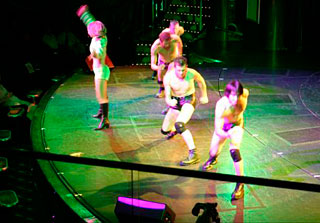 The evening finished off on an amusing note. David Pogue’s wife Jennifer convinced a couple of us to go to the “Solid Gold” floor show with her and her youngest son, who is four. The show was a revue showcasing some of the greatest pop hits as interpreted by a young and enthusiastic entertainment troupe. At one point, during a rendition of Hot Stuff by Donna Summer, the male dancers were doing The Full Monty routine (except that they were young and buff).
“They’re getting ready for bed,” the little guy said, as the dancers stripped down, losing everything except (thankfully) their little black spandex shorts.
“They have funny pajamas,” he noted.
(Thanks to Sandy for the photo of the hot boy dancers. See, I told you it was for my blog, not for me…)
The evening finished off on an amusing note. David Pogue’s wife Jennifer convinced a couple of us to go to the “Solid Gold” floor show with her and her youngest son, who is four. The show was a revue showcasing some of the greatest pop hits as interpreted by a young and enthusiastic entertainment troupe. At one point, during a rendition of Hot Stuff by Donna Summer, the male dancers were doing The Full Monty routine (except that they were young and buff).
“They’re getting ready for bed,” the little guy said, as the dancers stripped down, losing everything except (thankfully) their little black spandex shorts.
“They have funny pajamas,” he noted.
(Thanks to Sandy for the photo of the hot boy dancers. See, I told you it was for my blog, not for me…)
MacMania: Ship of Geeks
Shawn King. (If you know Shawn, you know it’s hard to miss Shawn in a crowd.) Shawn’s wife and co-host, Lesa Snider King, was working furiously on her forthcoming book, Photoshop CS4: The Missing Manual while we waited to board. And waited. And waited. Imagine being at the gate for a plane that holds 2600 passengers. And multiply that by 3, because everything seems to be three times as complicated on a cruise.
The first morning, Don McAllister did a great presentation called “Mastering Your Inbox.” I had to laugh at this dictum of his:
“Don’t live in your inbox.”
I know that I usually do, but being on this cruise will probably help cure this unhealthy obsession. We have internet access, but it is slow and not 100% reliable. I can’t live in my inbox now. (And no, it has nothing to do with being distracted by all the fun non-geek cruise activities…)
Don talked about using TextExpander for speeding up the process of replying to emails and processing your inbox. He also showed off an interesting program called MailTemplate from MailTank, which lets you build very useful templates. I am going to definitely check it out, when I have the bandwidth to download anything.
Lesa took a break from editing her manuscript to give a workshop on Digital Photo Workflow: How to Shoot and Edit Like A Pro. She’s great at pointing out simple things you can do to take better photos and at making the behemoth known as Photoshop into useful pointers for the amateur user. I love her tips on using grayscale and sepia filters to make otherwise blah photos into something really interesting.
(I need to give a plug for Lesa’s book here. She is working so hard on this. It wasn’t part of her plan to be editing during the cruise, but book publisher schedules wait for no one. If you want to know everything worth knowing about Photoshop, be sure to pre-order a copy NOW and support the hardest-working person on the Geek Cruise.)
The highlight of my day, aside from finding the perfect pizza in Naples, was David Pogue’s iPhone presentation. I am an unabashed Pogue Fan Girl. He’s been one of my favorite writers since I read Mac OS 9 for Dummies years ago. His columns and videos for the New York Times are not to be missed, especially when he draws on his background as a Broadway composer to spoof technology.
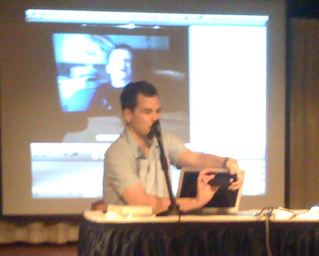
Great speakers, like great performers, know how to improvise. David thought he’d discovered a device that would project his iPhone to the screen, but it only worked for video. He then tried to use the iSight camera to get the image up, but the iSight flips the video to be a mirror-image. He finally hit on the solution of using iMovie in iSight capture mode. iMovie does not flip the video. All David had to do was face his MacBook Air away from himself and hold the iPhone in front of the iSight, facing him. Check out the photo below.
 It was a great presentation. David is so enthusiastic about the iPhone on so many levels, it’s contagious. He showed off lots of iPhone Apps. Must have: “Fake Phone Call.” With it, your iPhone can simulate a phone call coming in. Great for those meetings or dates where you need an excuse to get away. It’s also apparently great for pranksters: David’s son even faked him out to think that Steve Jobs was on the line.
The boat is just pulling into Messina, Sicily as I am typing this, so I’ll close here for today. (If it’s any consolation to those envying us on this cruise, just know that it has been pouring rain with lots of lightning all night and it looks like a lousy day to get off the boat.) Tomorrow we’ll be at sea all day en route to Alexandria, Egypt, so I hope to have lots more to share from all the great presentations that are scheduled for that day.
It was a great presentation. David is so enthusiastic about the iPhone on so many levels, it’s contagious. He showed off lots of iPhone Apps. Must have: “Fake Phone Call.” With it, your iPhone can simulate a phone call coming in. Great for those meetings or dates where you need an excuse to get away. It’s also apparently great for pranksters: David’s son even faked him out to think that Steve Jobs was on the line.
The boat is just pulling into Messina, Sicily as I am typing this, so I’ll close here for today. (If it’s any consolation to those envying us on this cruise, just know that it has been pouring rain with lots of lightning all night and it looks like a lousy day to get off the boat.) Tomorrow we’ll be at sea all day en route to Alexandria, Egypt, so I hope to have lots more to share from all the great presentations that are scheduled for that day.
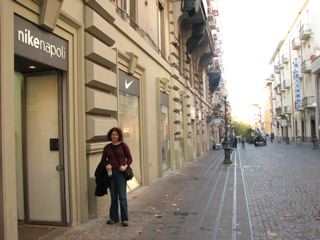 Me, outside the Nike Store in Naples. A little piece of Oregon away from home…
MacMania: Jean's Excellent Mac Adventure
MacMania 8 cruise. I am supposed to have some access to the internet on the trip so I’m planning to post stories and photos right here. I’ll be on Twitter as well.
I’ll be putting my new MacBook Pro through its paces, and will have my Sony MiniDV and Canon PowerShot cameras with me. If the internet access is good enough, I might be able to post some videos too.
I’m looking forward to seeing good friends (Shawn and Lesa King from Your Mac Life, Don McAllister from ScreenCastsOnline), meeting internet friends in real life (Pat Fauquet from MacMousecalls) and making some new friends too.
