TextExpander: How Much Time Have We Saved?

Philip Blog, TextExpander

posted some interesting personal information today: a screenshot how much time she has saved by using TextExpander. So far she’s saved 1.54 hours. For her, that’s worth at least the price of $29.95. By total coincidence, Philip, Greg and I were talking about that yesterday, as we were discussing features for TextExpander 2 (more on that next week!). I found out my stats are pitiful compared to Greg and Philip. Here’s our screenshots: Jean: TextExpander time saved - Jean Philip (his would be higher if his mother board hadn’t gotten fried a while back): TextExpander time saved - Philip Greg (the winner!): TextExpander time saved - Greg Can anybody top Greg? Send your screenshot to me at jean@smileonmymac.com. Let us know how you racked up the hours and what you’re doing with all that time you saved! We’ll post the entries on the blog. So what am I going to do with my time saved? A post at the Literature and Latte forum has an interesting suggestion:

… according to TextExpander, I’ve saved almost three hours by not writing out names. Let’s see, three hours of my life returned to me… and one cigarette costs me one minute of my life… divided by twenty cigarettes a pack…
But I’m coming up on my tenth anniversary of quitting, so that won’t do. Can I eat some extra chocolate cake instead? (Let’s see: 6.94 hours of stationary bike = 3310 calories = 13.9 pieces of chocolate cake…)

PageSender 4.0: Listen to Your Customers

Philip Blog, PageSender

five years in business shipping PageSender, that lesson is: listen to your customers. You folks are great. You use the product, buy the product, tell your friends about it, and you tell us what you need. We shipped PageSender 4.0 this Tuesday, and it seems to have gone over well. You’ve asked for spam filtering and snazzier covers for some time, and we’re pleased to be able to deliver. Frequently, people ask why it’s called PageSender and not FaxSender or PageFaxer. The answer is that PageSender 1.0 didn’t start out with support for faxing. PageSender was designed to make it easy to Email anything you could print, directly from the print dialog (and you can still do that today). Almost immediately after PageSender 1.0 shipped, customers and potential customers wrote asking for fax modem send support. We delivered two months later. Then they asked for receive support. We delivered another two months later. In a short time, PageSender became fax software, and before long it became full-featured fax software. It’s not what we’d planned, but it’s what our customers wanted. So, thank you for all your feedback! Keep it coming. We’ll continue to listen to what you need and to deliver it.


DiscLabel 4.2 features

Philip Blog, News

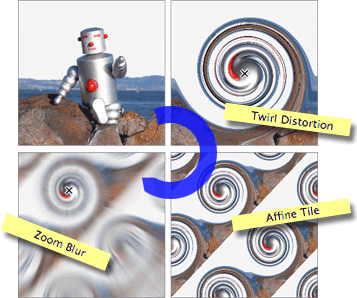
Effects feature. All it needs is an image selected and the effects button pressed: image effects You can start with an single photo of your loved one and really transform them like the following… effectsmontage.gif Individual effects can be combined easily, and the effects reordered. So if you are searching for that perfect background image for a CD, maybe it is simpler to just find one with the colors you like, and transform it with effects!

TextExpander HTML Snippet File Updated

Philip Blog, TextExpander, TextExpander Tips

using the arrow keys, and then it will be as if the .com is coming at the beginning of a word. I was planning to issue an update next week, but here it is Saturday morning. I’m doing my usual Saturday morning thing: working out at the gym while listening to podcasts. I’m catching MacBreak Weekly with Leo Laporte & Co., when I hear the familiar little “pop” sound of TextExpander. “Cute,” I think, “They’re using TextExpander.” Then Leo says “I’m really mad.”

TextExpander shipped out HTML entity abbreviations and one of them is .co, and everytime I type .com now in my browser, it replaces it with the entity for copyright. It’s driving me crazy.
Ack! I practically fall of the stationary bike. I know what I’ll be doing when I get home, and it’s not jumping in the shower. (At least not right away.) The revised HTML snippet file is now available. The abbreviation for © has been changed from “.c” to “.copy”. It’s not a huge savings in terms of keystrokes (one to be exact), but at least it won’t conflict with a commonly-typed combination of characters. I also updated the combined snippet file, which has both HTML and Autocorrection snippets. Besides fixing the “.c” problem in this file, I also reversed the order so that the HTML snippets appear before the Autocorrect snippets, on the theory that you’re more likely to want to review HTML snippets you can use than spelling errors you may or may not make. Look, despite my stint in Geekcorps, I’ve never claimed to be a geek. My apologies to Leo and everyone else who was plagued by the unwanted “pop”. It’s a pretty safe bet that Philip and Greg are not going to hand over any coding projects to me anytime soon. OK, now it’s time for that shower. grin

PDFpen comes to Long Island

Philip Blog, PDFpen

That’s right, folks! You don’t have to shlep on the L.I.E. all the way to Manhattan to get your favorite PDF editing tool for the Mac. From our intrepid correspondent, George Canellis:

Newsflash! The retail box of PDFpen has been spotted in the Walt Whitman Apple Store in Huntington Station, New York! Here’s your product in the hands of yours truly, who just happens to be proudly wearing his official Your Mac Life hockey jersey which, as luck would have it, is sponsored by SmileOnMyMac. What a coincidence!!! wink Congratulations on scoring some prime shelf real estate in our favorite retail store!!
Thanks, George! (George gets a free product from SmileOnMyMac, and you can too! Just send your Apple Store PDFpen photos to jean@smileonmymac.com. If we post your photo, you’ll get your choice of one of our great products.) BTW, I’ll be coming to Long Island to speak to the Long Island Macintosh Users Group (LIMac) on October 12th.